Introduction
pytrends is a library for fetching data from Google Trends.
GitHub - GeneralMills/pytrends: Pseudo API for Google Trends
Pseudo API for Google Trends . Contribute to GeneralMills/pytrends development by creating an account on GitHub.
 https://github.com/GeneralMills/pytrends
Installation
This assumes pipenv is already set up.
$ pipenv install pytrendsGet started
First, let’s try running it. Let’s fetch the search terms that are trending in Japan today.
from pytrends.request import TrendReq

pytrends = TrendReq(hl="ja-JP", tz=360)

print(pytrends.trending_searches(pn="japan"))
The output looks like this.
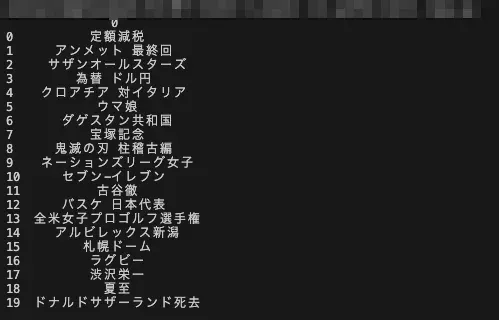
We were able to fetch the recent trends.
Fetching real-time trends
To fetch real-time trends, use realtime_trending_searches.
print(pytrends.realtime_trending_searches(pn="JP"))The return value is a pandas.DataFrame.

Summary
I tried out pytrends, a library for fetching Google Trends data.
By combining it with existing techniques, you might be able to use it for trend analysis, prediction, and more.