As shown in the image, you can create a date field in a Notion DB and automatically calculate things like “how many days from now until that date” or “how many days have passed since that date”.
Setup
Required fields
- A “Date” type field: the field where you set the reference date
- A “Formula” type field: the field that displays the number of days elapsed since the reference date
Once you’ve created those two fields, edit the “Formula” property.
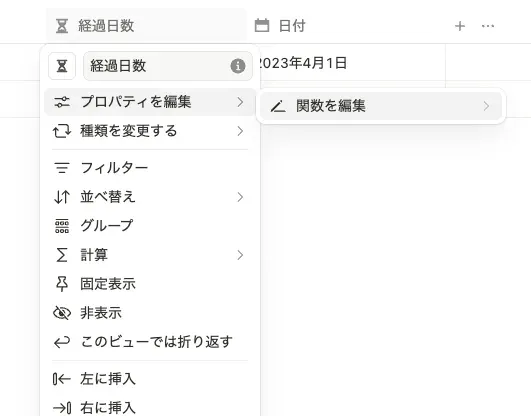
Go to “Edit property” → “Edit function”.
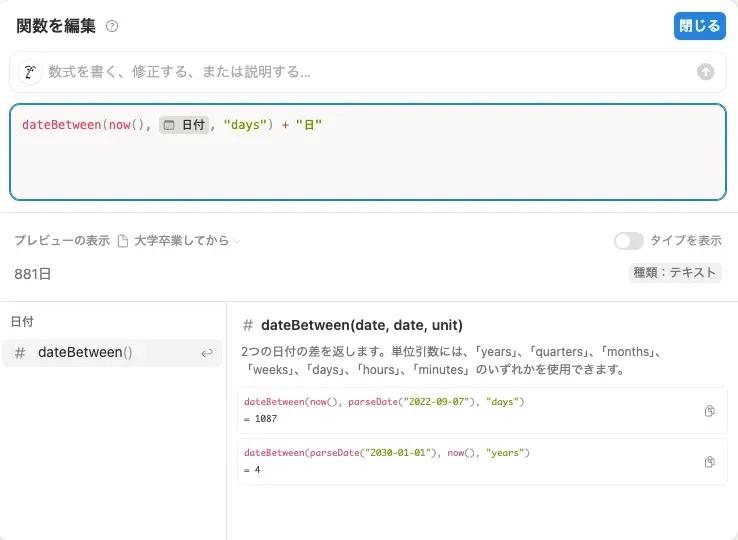
Use the dateBetween function to calculate the number of days elapsed.
dateBetween(now(), prop("日付"), "days") gives you a number, so tweak it to your liking, for example dateBetween(now(), prop("日付"), "days") + "日", and you’re done.
Wrapping up

You can use it like this too 🥳