Introduction
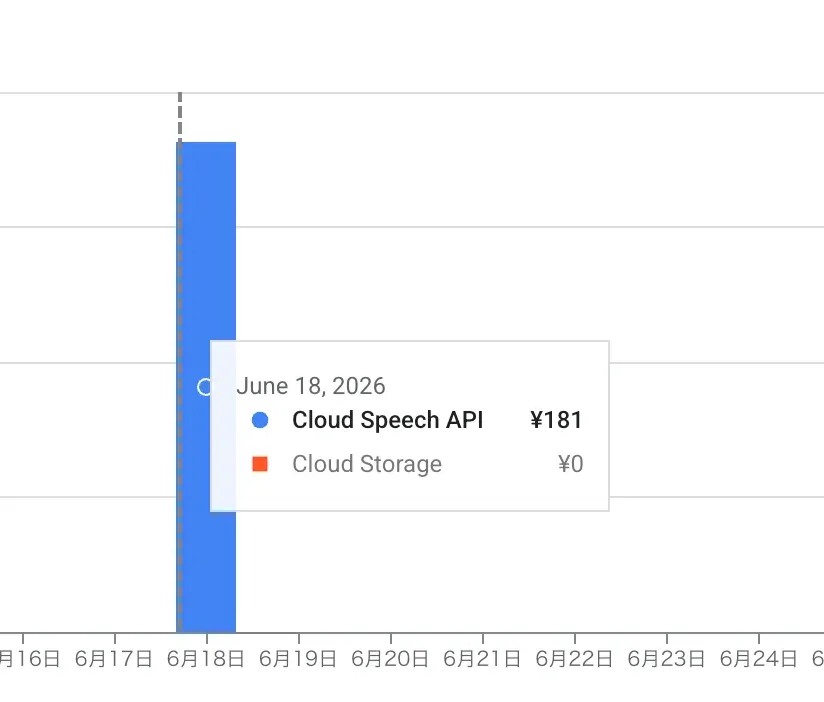
When I transcribed a roughly one-hour audio file using the Speech-to-Text API from the Google Cloud Console, it cost 181 yen, so I looked for ways to keep the cost down.
As a result, I managed to bring it down to 25 yen, a roughly 80% cost reduction.
Since these were easy things to try and had a real effect, I’m leaving this as a log.
Why I used the Speech-to-Text API for transcription
There are plenty of transcription services out there, but the Speech-to-Text API is really handy when you want to do rough speech recognition.
Also, since many services are subscription-based or expensive, pay-as-you-go can end up cheaper for users who don’t transcribe very often.
This time I wanted to use “speaker diarization,” a feature that distinguishes who said what in audio with multiple speakers, so I used the Speech-to-Text API.
The actual bill
The Speech-to-Text API requires no setup, and you can upload from the Google Cloud Console and transcribe through the GUI.
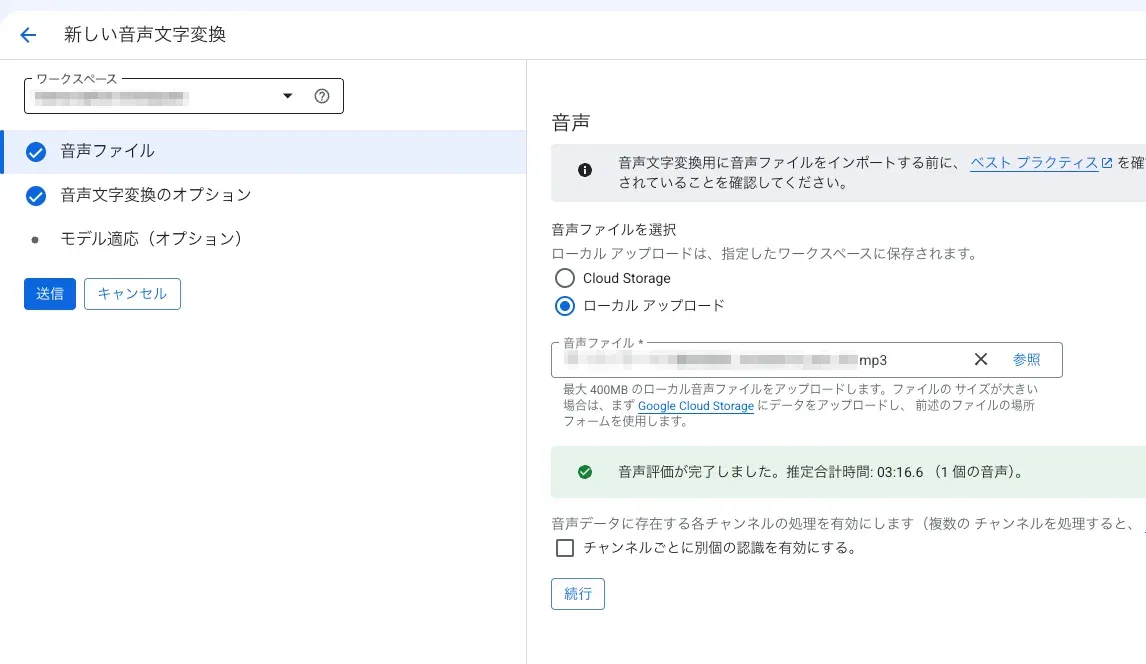
When I actually transcribed about one hour of audio, the bill came to 181 yen.
Since I wanted API version V2 and speaker diarization, I used the Chirp 3 model.
Why it gets expensive / how you can make it cheaper (cost structure)
Roughly speaking, the Speech-to-Text API price is determined by “audio length × number of channels × unit price of the recognition mode.” This time I tried the following two things.
1. Number of channels — why converting to mono helps
Billing is calculated by “the total length of processed audio,” but with multichannel audio, the lengths of all channels are summed and billed. In other words, even for the same one hour, stereo (2ch) costs twice as much as mono (1ch).
You don’t need the left/right difference for transcription, so simply dropping to 1ch with ffmpeg literally halves the cost.
2. Recognition mode — a 4x difference between standard and batch
The other factor is the type of recognition. Standard recognition, aimed at real-time use, is about $0.016/min, but Dynamic Batch recognition, which gives up immediacy, is about $0.003–0.004/min, roughly 1/4 as cheap. Transcription doesn’t need to come back on the spot, so I sent it as a batch.
These two multiply together, taking it from 181 yen → 25 yen (about 80% off). It got expensive because I had sent it as stereo with standard recognition.
The cost reduction method
What I did is simple: the following two steps.
- Convert to 1ch mono with ffmpeg and split every 20 minutes — halves the number of channels. Also, since the Speech-to-Text API supports audio up to 20 minutes, split it before sending. Putting this in a shell script is convenient.
- Send it to Dynamic Batching transcription via the SDK (Python) — instead of GUI + standard recognition, send it as a batch to lower the unit price. The split files can each be submitted as batches in parallel.
# Extract audio from the video, convert to mono, and split into mp3 every 20 minutes (1200 seconds)
ffmpeg -i input.mp4 -vn -ac 1 -acodec libmp3lame -ab 128k \
  -f segment -segment_time 1200 -reset_timestamps 1 \
  output_part_%02d.mp3
Implementation
The key is specifying DYNAMIC_BATCHING for the processing_strategy of BatchRecognizeRequest. This is what creates the price difference from standard recognition. Chirp 3 and speaker diarization are also enabled together in the same config.
from google.cloud.speech_v2 import SpeechClient
from google.cloud.speech_v2.types import cloud_speech

def transcribe_batch_chirp(
    input_gcs_uri: str,   # gs://bucket/audio/foo.wav
    output_gcs_uri: str,  # gs://bucket/transcripts/
    project_id: str,
    location: str = "asia-northeast1",
    language_code: str = "ja-JP",
    model: str = "chirp_3",
) -> cloud_speech.BatchRecognizeResponse:
    endpoint = f"{location}-speech.googleapis.com"
    client = SpeechClient(client_options={"api_endpoint": endpoint})

    config = cloud_speech.RecognitionConfig(
        auto_decoding_config=cloud_speech.AutoDetectDecodingConfig(),
        language_codes=[language_code],
        model=model,
        features=cloud_speech.RecognitionFeatures(
            # Speaker diarization (change as needed)
            diarization_config=cloud_speech.SpeakerDiarizationConfig(
                min_speaker_count=2,
                max_speaker_count=2,
            )
        ),
    )

    request = cloud_speech.BatchRecognizeRequest(
        recognizer=f"projects/{project_id}/locations/{location}/recognizers/_",
        config=config,
        files=[cloud_speech.BatchRecognizeFileMetadata(uri=input_gcs_uri)],
        recognition_output_config=cloud_speech.RecognitionOutputConfig(
            gcs_output_config=cloud_speech.GcsOutputConfig(uri=output_gcs_uri)
        ),
        # Send as a batch instead of standard recognition
        processing_strategy=cloud_speech.BatchRecognizeRequest.ProcessingStrategy.DYNAMIC_BATCHING,
    )

    operation = client.batch_recognize(request=request)
    return operation.result(timeout=1800)
The input audio has to be placed in GCS, so the overall flow is like this.
- Upload local audio to GCS
- Batch-transcribe with the
transcribe_batch_chirpabove (the result JSON is output to GCS) - Download the result JSON and convert it to SRT
- Once transcription is done, delete the audio on GCS (leaving it there incurs charges)
It’s convenient to extend the code above to automate everything through deleting the GCS audio via the API.
The bill after reduction
When I re-transcribed the same roughly one-hour audio with mono conversion + Dynamic Batching, the bill came to 25 yen.
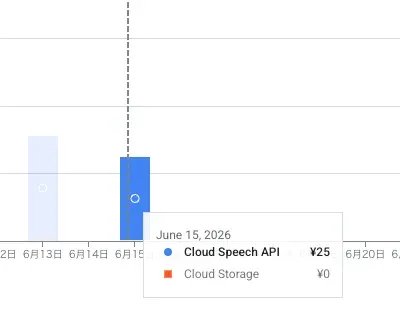
Since the model is still Chirp 3 in both cases, there’s no significant difference in transcription accuracy. Just by revisiting the settings, I effectively got results of nearly the same quality for about 80% less.
| Before | After | |
|---|---|---|
| Channels | Stereo | Mono (1ch) |
| Recognition mode | Standard recognition | Dynamic Batching |
| Bill (~1 hour) | 181 yen | 25 yen |
Accuracy caveats and where to use it
As for accuracy, in Japanese there are a fair number of kanji conversion mistakes and misrecognized proper nouns. It’s at a level where you’d need to touch it up before using the transcription as a clean final copy.
That said, if the purpose is “feeding it to an AI” — for example, summarizing it into meeting minutes with an LLM or making the content searchable — a few typos aren’t a problem. As long as the meaning comes through, the downstream AI absorbs them.
Conversely, if you need a word-for-word accurate transcript (subtitles or articles for publication), it’s safer to assume final proofreading. This time, speaker diarization also tells you “who said what,” so it’s plenty practical as a rough draft for meetings or interviews.
Summary
Even with the same Chirp 3 model, just revisiting the preprocessing and recognition mode took it from 181 yen → 25 yen (about 80% off). Looking back at the key points,
- Mono conversion halves channel-based billing
- Dynamic Batching lowers the recognition unit price to about 1/4
these two are what did the work. Both are measures that take effect without sacrificing accuracy, with just a small change to the code or settings. If the Speech-to-Text API feels “more expensive than I expected,” these two are worth trying first.
References

 https://docs.cloud.google.com/speech-to-text/docs/multiple-voices