Introduction
I started studying for the PCA (Professional Cloud Architect), so these are notes from that process. I normally use AWS and started reading the docs with almost no Google Cloud experience.
As I read through, what I felt was: “With AWS knowledge you can translate almost every service, but there are exactly two areas that differ at the philosophy level.”
- Difference #1: account management vs. resource hierarchy
- Difference #2: IAM users and roles vs. service accounts
These two cannot be handled by rote-memorizing a comparison table; you need to swap your way of thinking. Put differently, once you have these two down, the comparison table at the end of the article covers the rest. I am organizing this for others coming from AWS into Google Cloud, and for my future self.
Difference #1: Account Management vs. Resource Hierarchy
AWS: A World Where You Separate by One System = One Account
First, a review of the AWS side. When separating environments in AWS, the strongest boundary is the “account.” You do see setups where STG/PROD coexist within a single account using VPCs and naming conventions, but the best practice is said to be separating the accounts themselves per environment and per system.
- Create multiple accounts and bundle them with AWS Organizations
- Group accounts by OU (organizational unit)
- Lay down guardrails with SCPs (service control policies), such as “this operation is forbidden under this OU”
Billing is also account-based by default, with the consolidated billing of Organizations to bundle it together. That is the worldview.
Google Cloud: A Hierarchy of Organization > Folder > Project
Google Cloud is a tree structure from the start. In the docs it is called the “resource hierarchy.”
Organization (example.com)
├── Folder: Production
│   ├── Project: myapp-prod
│   └── Project: batch-prod
└── Folder: Development
    ├── Project: myapp-stg
    └── Project: sandbox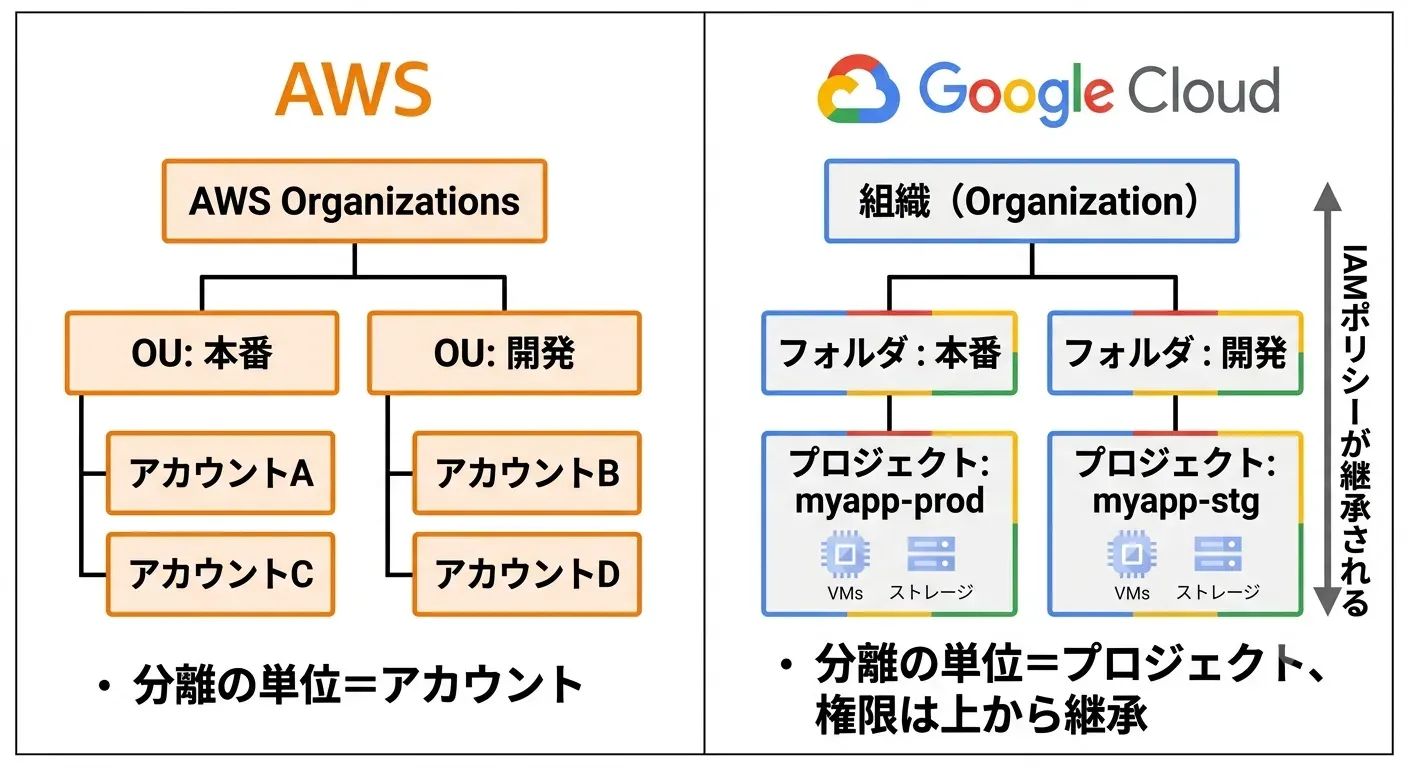
Here is how I understood each role.
- Project: the unit of billing, API enablement, and IAM scope. The separation boundary closest to an AWS account
- Folder: a box that groups projects. Equivalent to an OU
- Organization: the root of the tree. One per company (domain)
The feeling is “grow many projects inside a single contract (organization).” Unlike opening an AWS account, creating a project finishes in tens of seconds, so it is common to create one for testing and throw it away right after. This lightness was the biggest difference in feel from an AWS account.
The Mental-Conversion Table and the Misunderstanding I Fell Into
As a comparison table it looks like this.
| AWS | Google Cloud |
|---|---|
| AWS Organizations (the overall root) | Organization |
| OU | Folder |
| AWS account | Project |
| SCP | Organization policy |
Here I misunderstood, thinking “maybe you separate environments (STG/PROD) by folder.” Correctly, environment separation is done at the project level. The basic form is to separate projects like myapp-prod and myapp-stg.
So what are folders for? They are boxes for bundling groups of projects to apply permissions collectively. For example, if you attach IAM to a production folder saying “only administrators can access production,” it is inherited by all projects underneath. It is the same idea as putting production accounts into an OU and applying an SCP.
This “inheritance” is the crux of the resource hierarchy: an IAM policy attached to an organization or folder automatically flows down to every level below. And by default it is additive Allow; you cannot strip away, at a lower level, permissions granted at a higher level. An AWS brain accustomed to Deny-priority evaluation stumbles here once, so I think it is a point to watch out for as PCA exam prep too.
Difference #2: IAM Users and Roles vs. Service Accounts
AWS: A World of IAM Users and IAM Roles
Again, starting with an AWS-side review. AWS identities are created “inside” the account.
- For humans you create IAM users and write Allow/Deny in fine detail in policy documents (JSON)
- For programs and EC2 you attach IAM roles and run with temporary credentials from STS
Both identities and policies live entirely inside the account.
Google Cloud: A World Where You Grant Permissions Directly to Google Accounts
Google Cloud has no concept of an IAM user at all. At first, reading the docs, I searched all over for “where are the steps to create a user?”
The target you grant permissions to (the principal) is a Gmail or Google Workspace account, that is, the Google account itself. The identity lives outside the cloud (at Google), and all Google Cloud’s IAM does is manage the binding of “who, which role, on which resource.”
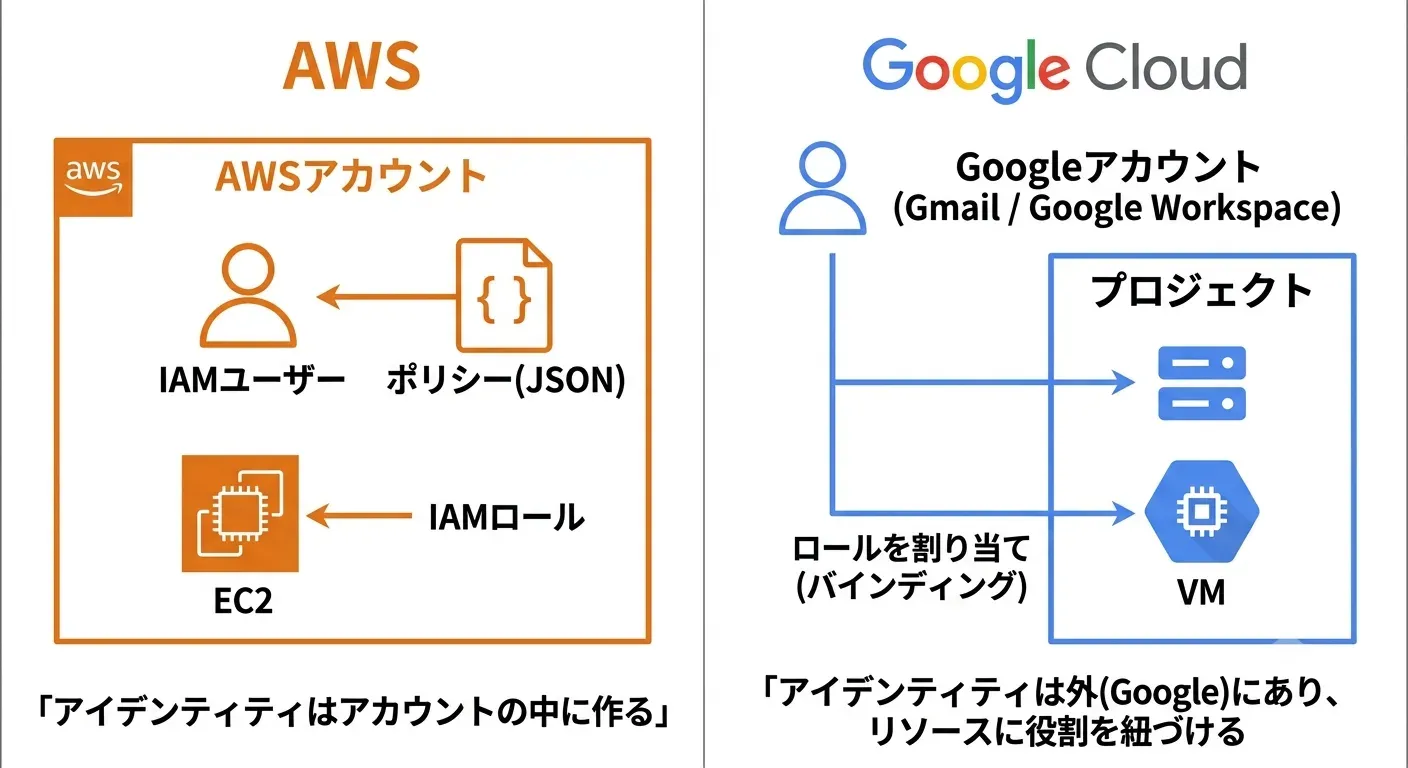
Another difference is that you do not write policies yourself in JSON. The basic form is to assign predefined roles like roles/storage.objectViewer to a principal, and evaluation is in principle an accumulation of Allow. A deny policy mechanism was added later, but I understand it as an exceptional case.
Service Accounts: Both a Resource and an Identity
The identity for programs is the service account. Attaching it to Compute Engine or Cloud Run to run things feels a lot like attaching an IAM role to EC2, and this translates straightforwardly.
There is one decisively different point, though. A service account is an identity and, at the same time, is itself a resource belonging to a project.
- Its face as an identity: it gets roles granted and accesses Cloud Storage or BigQuery
- Its face as a resource: the service account itself has an IAM policy attached, controlling “who can use this service account” via
roles/iam.serviceAccountUserand the like
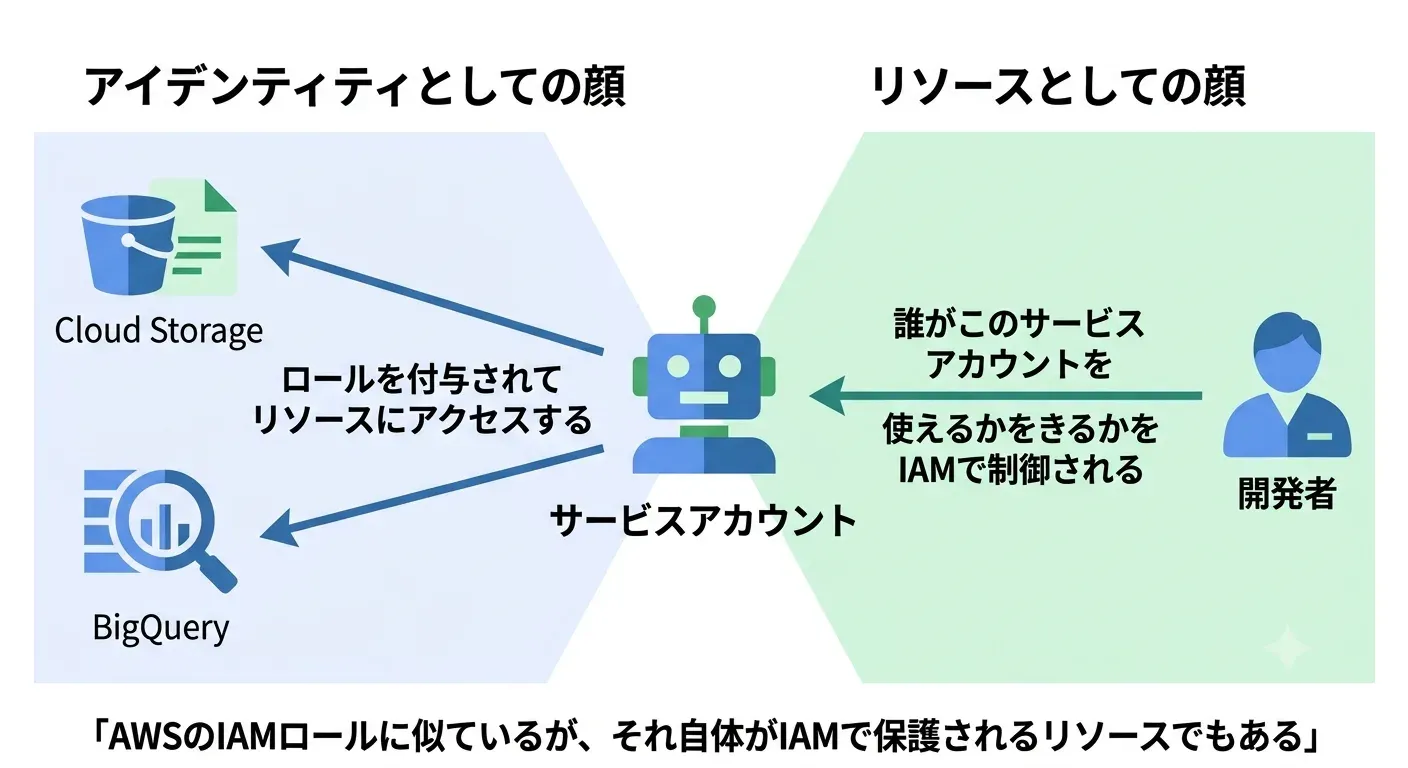
AWS IAM roles also have a trust policy (who can AssumeRole), so the idea is close, but in Google Cloud it is a more general mechanism called “service account impersonation,” which even includes a human temporarily operating with a service account’s permissions.
Note that a service account can also issue a key (a JSON file) that you place locally, but this is considered an anti-pattern. It is a long-lived credential where leaking means game over, so from GitHub Actions and the like, keyless authentication using Workload Identity Federation is recommended. I felt the same air as the AWS trend of eliminating IAM user access keys and leaning on IAM roles.
The Mental-Conversion Table Around IAM
| AWS | Google Cloud |
|---|---|
| IAM user | Google account |
| IAM group | Google group |
| IAM role (attached to EC2, etc.) | Service account |
| Policy document (JSON) | Predefined role + binding |
| STS AssumeRole | Service account impersonation |
| Eliminating access keys | Eliminating service account keys |
None of these are exact matches, only “close concepts,” so treat them purely as a starting foothold.
Quick Mental-Conversion Table: The Standard Services
Only the two above differ in philosophy; individual services can mostly be translated with a comparison table.
| AWS | Google Cloud |
|---|---|
| Amazon S3 | Cloud Storage |
| Amazon EC2 | Compute Engine |
| AWS Lambda | Cloud Run functions (formerly Cloud Functions) |
| Amazon ECS / Fargate | Cloud Run |
| Amazon RDS | Cloud SQL |
| Amazon DynamoDB | Firestore / Bigtable |
| Amazon VPC | VPC |
| Amazon CloudWatch | Cloud Monitoring / Cloud Logging |
| Amazon Route 53 | Cloud DNS |
| Amazon CloudFront | Cloud CDN |
| AWS CloudFormation | No equivalent (Terraform is the de facto standard) |
Let me note two that are easy traps because they share a name but differ inside.
- VPC: an AWS VPC is confined to a region, but a Google Cloud VPC is a global resource where you can create subnets across multiple regions within one VPC. The premises of cross-region designs change
- IAM: as mentioned, Google Cloud IAM is in principle an accumulation of Allow, inheriting down the hierarchy. You basically cannot bring in the AWS idea of “overriding with Deny to narrow things down”
Summary
My own conclusion is “memorize the convertible parts and the swap-the-whole-philosophy parts separately.”
- Service mapping (S3 ⇄ Cloud Storage, etc.) is fine with a comparison-table translation
- Only the resource hierarchy and IAM should be learned fresh, without trying to map AWS concepts onto them: as a tree structure with inheritance, direct attachment to Google accounts, and the two faces of a service account
If you want hands-on practice, I think the quickest way is to create two projects on the free tier, grant a role via IAM to only one of them, and feel how the scope is split. Note that organizations and folders cannot be created with just a personal Gmail account; you need Cloud Identity (or Google Workspace), so for personal experiments it is realistic to focus on project separation and IAM behavior.
For PCA exam prep, the areas of resource hierarchy, IAM inheritance, and the two faces of service accounts seem to be asked repeatedly, so I will read through the official docs based on these notes.
References
 https://cloud.google.com/resource-manager/docs/cloud-platform-resource-hierarchy
 https://cloud.google.com/iam/docs/overviewhttps://cloud.google.com/iam/docs/service-account-overviewhttps://cloud.google.com/iam/docs/best-practices-service-accountshttps://cloud.google.com/docs/get-started/aws-azure-gcp-service-comparison