https://docs.github.com/en/packages/working-with-a-github-packages-registry/working-with-the-container-registry
I tried to register something to GitHub Packages following this document, ran the docker push command, and got permission denied.
Even after setting permissions properly, it still errored out, so I got a bit stuck.
Here’s how I solved it.
TL;DR
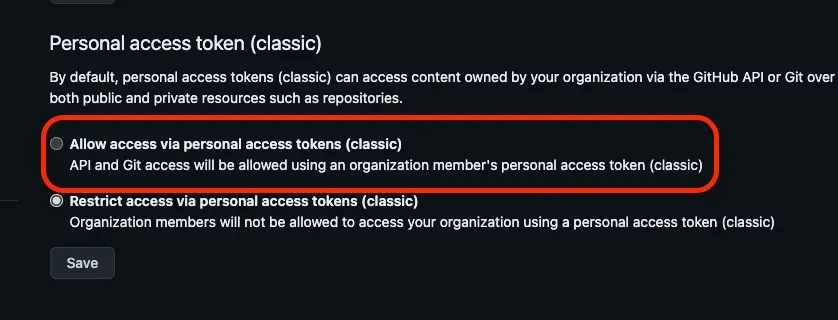
As of now (June 2024), only personal access tokens (classic) can be used to push to Packages. You need to enable personal access tokens (classic) in your organization’s settings.
Error Details and Solution
denied: permission_denied: `OrgName` forbids access via a personal access token (classic). Please use a GitHub App, OAuth App, or a personal access token with fine-grained permissions.There are two kinds of personal access tokens you can use for pushing to GitHub Packages.
The recommended one is the newer personal access token (fine-grained personal access token).
However, this fine-grained personal access token cannot be used to push to GitHub Packages.
So, as of now (June 2024), only personal access tokens (classic) can be used.
https://docs.github.com/en/authentication/keeping-your-account-and-data-secure/managing-your-personal-access-tokens#creating-a-fine-grained-personal-access-token
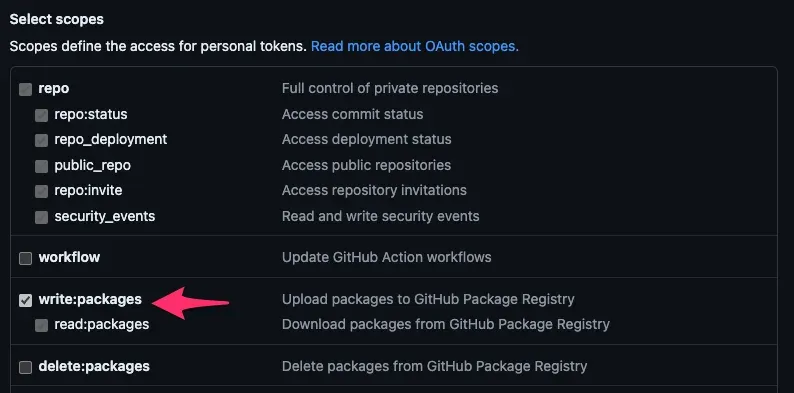
denied: permission_denied: The token provided does not match expected scopes.This error appears when the access token’s scopes are insufficient.
The specific scopes required are as follows. (repo gets enabled automatically.)
Also, to use personal access tokens (classic) within an organization, you need to enable Allow access via personal access tokens (classic) in the organization’s settings.
(I had missed this, which is why I got the error and got stuck.)